

How to Download and Install Android Utility Tool V150 To Remove Google Account or Bypass FRP All Samsung Models 2024 With One Click fix enable adb fail
Features
- Remove FRP
- Force Brom Mode
- Unlock Bootloader
- Flash Samung
- Reboot Download Mode
- Reboot Factory Mode
- Reboot Fastboot Mode
- Flash Huawei
- MTP Mode Factory Reset
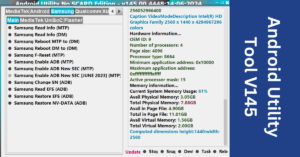
Samsung
Main
- Samsung Read Info (MTP)
- Samsung Reboot MTP to Download Mode (DM)
- Samsung Factory Reset (MTP)
- Samsung Enable ADB (MTP)
- Samsung Enabel ADB SEC (MTP)
UniSoC
- Samsung UniSoC Boot Repair via BL (FM)
- Samsung UniSoC A03 Boot Repaie (FM)
- Samsung UniSoC A03 Core Boot Repair
- Samsung UniSoC UnLock Bootloader (FM)
- Samsung UniSoC ReLock Bootloader (FM)
Android
Main
- ADB Read Info
- ADB Reboot to Fastboot
- ADB Reboot to Recovery
- ADB Reboot to EDL
- ADB G-Lock Bypass
- Fastboot Read Info
- Fastboot Flash Partition
- Fastboot Fix DM-Verity Error
- Generic Fastboot Factory Reset
- Generic Fastboot G-Lock Wipe
- RealMe (Wireless Test Assistant Mode) Disable
MTP Mode
- MTP Launch Browser (GENERIC) {Youtube}
- MTP Launch Browser (GENERIC) {GoogelMaps}
- MTP Launch Browser (GENERIC) {GooglePlay}
F?? ??? R????? ??? S??????? ?????? ?? ???? Smart P???? ?????? with Android Utility Tool V150
How To Use This Tool ?
- First Download the zip file from Below Link.
- Unzip/Extract the zip file with password : sbmobilelab
- Disable the Antivirus if you have one.
- Open the destination folder.
- Run the Setup.(Android Utility Tool v150)
- Install all Required Drivers and Connect the phone.
- Enjoy..!!
File Information
File Name: Android Utuility v150
Type: .rar
Compatible: Window XP, Window 7, Window 8/8.1, Window 10, Window 11
Download Link:
Password Winrar:
Tags: android utility tool, samsung frp bypass tool, how to download and install android utility tool v150, samsung frp bypass android 13/12/10/9 one click, new update android 13 fix failed to enable adb by test mode
Pingback: Understanding Factory Reset Protection (FRP): A Comprehensive Guid - SB Mobiles LAB