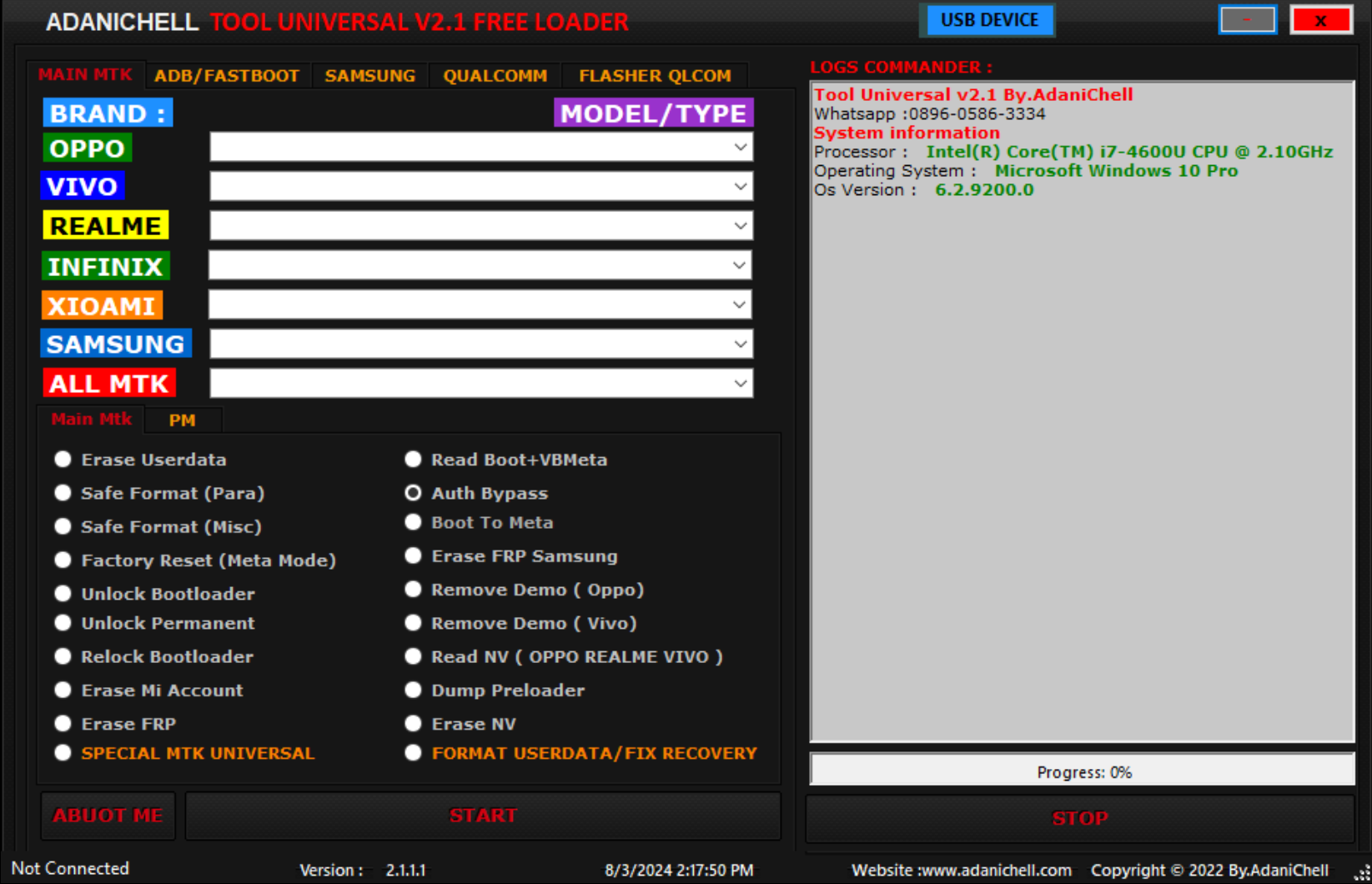
Adanichell tool is a universal tool that is Now Available for fast FRP Bypass Operations. This tool supports many android phone brands including popular brands like Samsung, Huawei and Xiaomi. Stay Tuned For More Updates Of This Tool.
Tool Features
Main:
- Erase FRP
- Erase FRP Samsung
- Erase Userdata
- Safe Format (Para)
- Safe Format (Misc)
- Factory Reset (Meta Mode)
- Unlock Bootloader
- Unlock Permanent
- Relock Bootloader
- Erase Mi Account
- Read Boot + VBMeta
- Auth Bypass
- Boot To Meta
- Remove Demo (Oppo)
- Remove Demo (Vivo)
- Read NV (Oppo, Realme, Vivo)
- Dump Preloader
- Erase NV
- Format Userdata / Fix Recovery
- Special MTK Universal
ADB/Fastboot:
- Read info
- Disable Mi Account
- Relock Fix Mi Account
- Factory Reset Xiaomi (Mi Assistant/Sideload Mode)
- Remove FRP Lock (Universal 1, Universal 2)
- Reboot Phone (Recovery Mode)
- Reboot Phone (Fastboot Mode)
- Reboot Phone (EDL Mode)
- Reboot Phone (Normal Mode)
- Disable OTA Update
FASTBOOT:
- Read Info
- Bootloader Information
- Factory Reset / Wipe
- Remove FRP Lock (SPD, Qualcomm, MTK/HTC)
- Remove Mi Account (Need UBL)
- Reboot EDL
- Xiaomi ARB Information
- Exit Fastboot
Samsung:
- Qualcomm/EDL Mode Erase FRP
- Download Mode Erase FRP (Exynos, Qcomm)
Supported Brands
- Oppo
- Vivo
- Realme
- Infinix
- Xiaomi
- Samsung
- All MTK
How To Download and Install Adanichell Tool:
- First Download the zip file from Below Link.
- Unzip/Extract the zip file with password : sbmobilelab
- Disable the Antivirus if you have one.
- Open the destination folder.
- Run the Setup.
- Install all Required Drivers and Connect the phone.
- Enjoy..!!
File Information
File Name: Adanichell Tool Universal V2
Type: .rar
Compatible: Window XP, Window 7, Window 8/8.1, Window 10, Window 11
Password Winrar: sbmobilelab
Tags: adanichell tool universal v2, qualcomm,spd and mtk cpu frp and format data, how to download and install adanichell tool universal v2. Qualcomm and mtk cpu supported, infinix, realme, vivo, oppo, samsung, all mtk